Help Center › Administration and security › Case management in COREDINATE
Case management bundles incidents as cases with tasks, linked incidents and files. Processes serve as templates. Here is how the module is structured.
Updated 25 Nov 2026 · Portal 9.34 · Tasks, incidents and forms · 3 min
In this article
- What case management is for
- Case and process
- Where to find case management in the portal
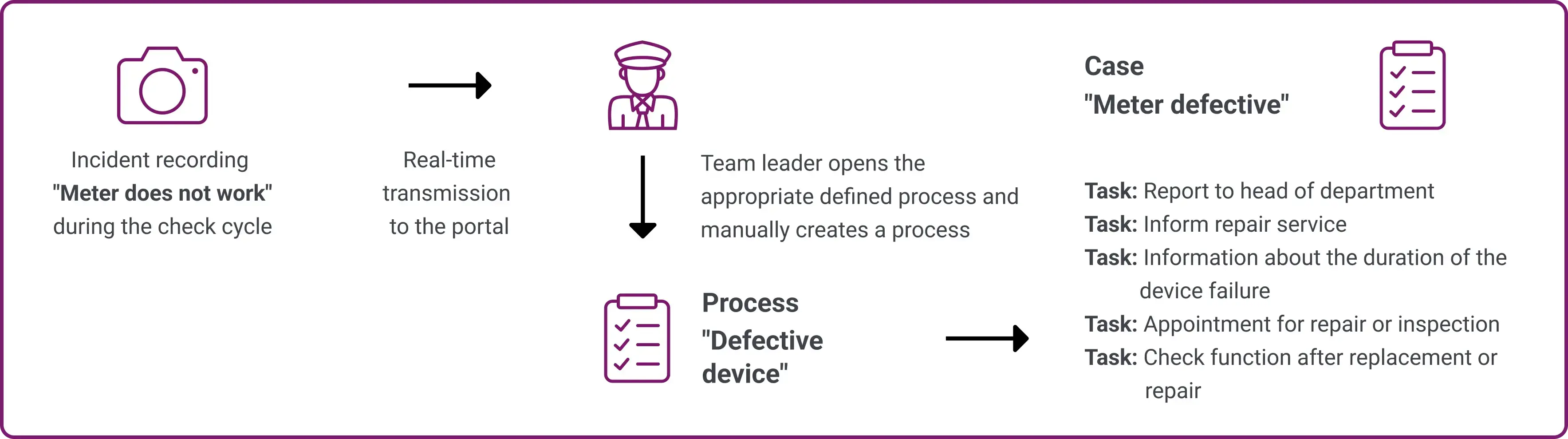
A simple task is often not enough. An employee reports a broken meter, then the department head must be informed, the repair service booked and the function checked after the repair. Case management keeps such cases together: who has which task, what is done, and which photos and incidents belong to it.
Prerequisites
- The Case management module is booked under Administration and Modules and enabled for the people working on cases. See Activate and manage modules.
- To create cases or processes you need the Cases or Processes permission with the level Manage. See Options for assigning rights to users.
Case and process
A case is the specific matter, for example Meter broken. It belongs to a customer or site and contains tasks, comments, linked incidents and files. Every case gets a consecutive number and is closed at the end. How this works is explained in Create cases.
A process is the template for matters that always run the same way, for example Defective device. It contains a name, a description and the tasks required. When the matter occurs, you create a case from it. See Create processes.
Where to find case management
- Master data and Cases: all open cases as a board or table.
- Master data and Processes: the templates.
- My cases in the main menu: your own cases, the number next to it shows the open ones.
- Work Results and Cases: opened and closed cases for review and export.
On the move, your employees work on cases in the app, see Edit cases in the app.
Good to know
- A user without the Cases permission can only complete cases and tasks assigned to them.
- Users can create cases from a process even without the Processes permission.
- The current price of the module is shown under Administration and Modules.
FAQ
How is this different from a normal task?
A task is a single step, often linked to a checkpoint. A case bundles several tasks, incidents, files and comments into one matter and is only closed when everything is done.
I cannot see the Cases and Processes menu items.
Either the case management module is not booked or you lack the Cases or Processes permission. Please contact an administrator.
Where do I find closed cases?
Under Work Results and Cases with the filter Closed.