Help Center › Getting started › What do I need to run COREDINATE?
Checklist for getting started: NFC smartphones, a data plan, COREDINATE checkpoints, optional access cards and a PC with a browser for the portal.
Updated 25 Nov 2026 · Portal 9.34 · Getting started · 3 min
In this article
- The checklist for getting started
- How much mobile data the app needs
- Checkpoints and access media
COREDINATE does not need expensive special hardware. With just a few things you can start straight away. This checklist helps you have everything ready before the first shift.
The checklist
- Mobile devices with NFC: Android smartphones or tablets with NFC, or iPhone 7 and later. You can buy the devices through COREDINATE or on the open market. The exact requirements are in System requirements of the COREDINATE app.
- One licence per device: every mobile device that works with COREDINATE needs a licence. You assign it in the portal under Administration and Devices. See Activate a mobile device.
- Internet on the devices: a SIM card with a data plan or Wi-Fi on site. See When does the app need internet?.
- Checkpoints: they are fixed in the property and prove that an employee was at a specific place. COREDINATE only processes its own checkpoints.
- Access media (optional): cards or key fobs that let employees log in to the app quickly. A user name and password also work.
- A PC, Mac or tablet with a browser for the portal at portal.coredinate.de, plus your login details. See What is the portal?.
Mobile data
We recommend a flat-rate data plan. How much data you need depends on how your staff work. A checkpoint scan uses very little data. Photos attached to incidents are much larger.
In our experience, around 500 MB per month is enough in most cases, as long as not many incident photos are sent. If the speed is throttled once the allowance is used up, the app still transfers the data.
Checkpoints and access media
NFC checkpoints come in various designs, including versions for metal surfaces. You order them in the COREDINATE shop, available via the Shop menu item in the portal. Alternatively, you can work with GPS checkpoints or beacons.
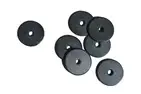
Credit-card-sized cards are the usual access medium, because they can be printed as a staff ID at the same time. Key fobs or checkpoints coded as access media are more robust. How to assign a card to an employee is described in Assign an access medium to an employee.

Good to know
- Lone worker protection requires Android devices. iPhones are currently not supported for it.
- How to set up the system after purchase is shown in How do I activate the system?.
FAQ
Can I use my employees' private smartphones?
Technically yes, if the device meets the system requirements and has NFC. Each device needs its own licence.
Can I keep using checkpoints from other providers?
No. COREDINATE only processes its own checkpoints.
Do my employees need an access card?
No. Logging in with a user name and password is enough. A card simply makes logging in faster.