Help Center › Getting started › How does COREDINATE work?
COREDINATE consists of an app and a portal: staff scan checkpoints with a smartphone, you plan and review in the browser. An overview.
Updated 25 Nov 2026 · Portal 9.34 · Getting started · 3 min
In this article
- The two building blocks: app and portal
- How a checkpoint is scanned
- The typical workflow from setup to report
COREDINATE is a guard tour system that needs no special hardware. Instead of a dedicated data collector, your staff use a smartphone with NFC. You see the results in the office straight away. This lets you prove to your customers who was where, when, and what happened on site.
The two building blocks
- The app runs on the security officer's smartphone or tablet (Android or iPhone). It is used to scan checkpoints, walk tours, complete tasks and record incidents. Install it from the Google Play Store or the App Store by searching for coredinate. See Install the app on a mobile device.
- The portal runs in the browser on a PC, Mac or tablet at portal.coredinate.de. This is where you create customers, sites and tours and review the work results. No installation is needed. See What is the portal?.
The app and the portal exchange data continuously over the internet. Without a connection, the app stores scans and sends them later. For details, see When does the app need internet?.
How a checkpoint is scanned
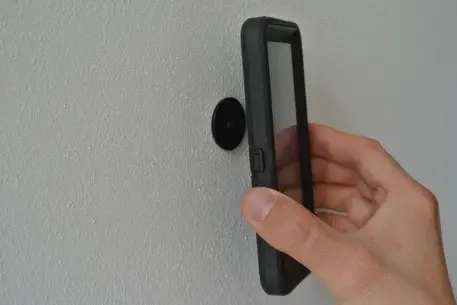
An NFC checkpoint is a small chip fixed in the property. The security officer holds the back of the smartphone against the checkpoint. On some devices the NFC antenna is near the camera. Depending on the model, scanning works best at a distance of 0.5 to 1 cm. The app records the time, the employee and the checkpoint.
Besides NFC, COREDINATE also supports GPS checkpoints (geofences) and Bluetooth beacons. See Create GPS checkpoints (geofences) and Teach beacons.
The typical workflow
- Set up the basics: In the portal, go to Master data and create a customer and a site, for example a property.
- Activate the device: The app is installed, the employee logs in and you assign a licence to the device in the portal. See Activate a mobile device.
- Teach checkpoints: Using the app, the checkpoints are assigned to a site on location. See Teach checkpoints.
- Plan a tour: In the portal, you group checkpoints into a tour, with time requirements if needed. See Create a tour.
- Work and review: The security officer walks the tour with the app. You see scans, incidents and tours under Work Results and create reports for your customers. See What are work results?.
Good to know
- COREDINATE only processes its own checkpoints. What you need to get started is listed in What do I need for operation?.
- On solid metal, NFC scanning may not work well for physical reasons. Special on-metal checkpoints are available for this. You reach the shop via the Shop menu item in the portal.
- Which smartphones are suitable is described in System requirements of the COREDINATE app.
FAQ
Do I need special hardware?
No. You need smartphones with NFC, COREDINATE checkpoints and a PC with a browser. There is no separate data collector.
Do I have to install the portal?
No. The portal runs in an up-to-date browser at portal.coredinate.de. You log in with your credentials.
Does COREDINATE work without NFC checkpoints?
Yes. You can also use GPS checkpoints (geofences) or Bluetooth beacons, whichever is more practical on site.