Version 9.34.0 adds the dashboard widget “Shift coverage” (“Schichtbesetzung” in the portal). Schedulers see live how well their running shifts are staffed and can find a replacement for a missing employee straight from the widget. The beta of the new shift planner starts with this release, and from now on shifts are assigned only to branches, customers or areas.
In short: The Shift coverage widget shows, for each running shift, who has turned up, who is missing and which positions are still open. “Find replacement” suggests suitable employees and lists any conflicts. Support can enable the new shift planner for you. Existing shifts have been moved to the new assignment automatically.
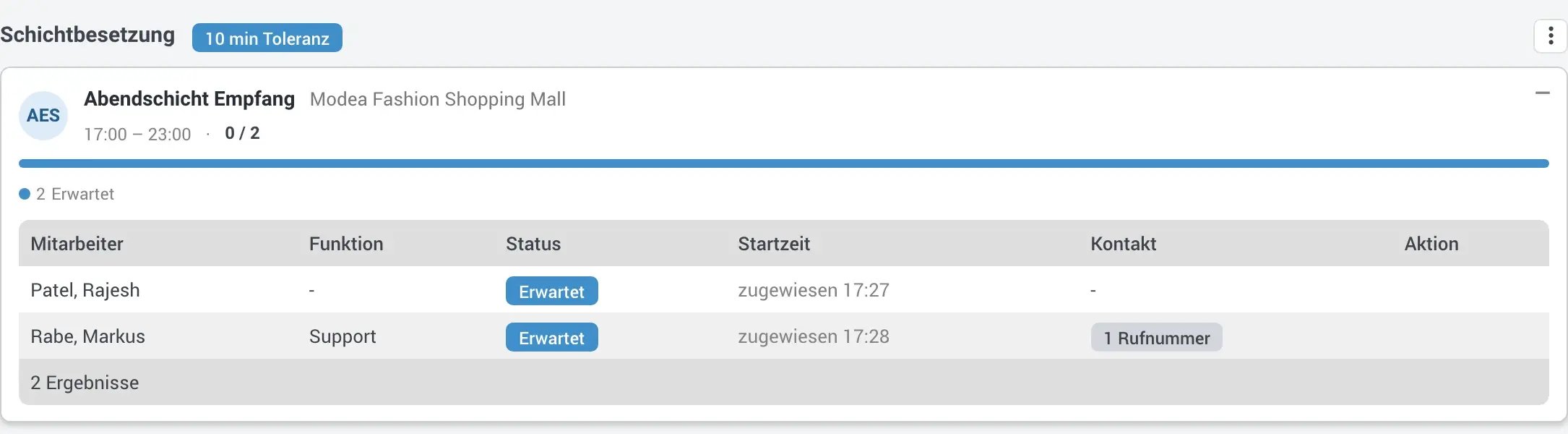
 The Shift coverage widget: running shifts at a glance
For every running shift, the widget shows the coverage, for example 0 / 2, with a coloured bar and a count line underneath. It tells you how many employees have turned up (and of those, how many arrived before the shift started or late), how many are still expected, how many are no-shows and how many positions are unassigned.
Expand a shift to see every assigned employee with role, status, start time and contact details. If someone does not turn up for duty, their phone number is right next to their name.
- Always current. The widget updates with every clock-in and clock-out, including for users who have no access to time tracking.
- Tolerance in the title. The configured tolerance appears next to the title, in the example “10 min Toleranz”.
- Automatically started shifts. You can choose to show these shifts as well.
For operations managers, this is the view for the start of duty. An unstaffed post stands out on the dashboard before the client calls, and office staff do not need access to time tracking to see it.
 Find a replacement without opening the rota
If an employee is missing or a position is open, click “Find replacement” (“Ersatz finden”) in the widget to start a replacement search. It suggests suitable employees from the same assignment, with role, teams, phone number and qualifications in a separate column. A sick call shortly before the shift starts can be handled in the same view where you spotted it.
For each suggestion, the replacement search shows possible conflicts:
- Double booking. The employee is already assigned at the same time.
- Rest period. The rest period before or after another duty would be breached.
- Absence. An absence is recorded for the employee.
- Hours. Maximum or target hours would be exceeded.
The warnings do not block your choice. If the situation calls for it, you can knowingly assign an employee with a conflict, but you see the conflict first. A teams filter narrows down the suggestions, and if needed you can also show employees who lack the required qualification. They are clearly marked.
You can fill several open positions in one step. When a replacement takes over from a no-show, the no-show is removed from the shift automatically. Plan and reality match again, and nobody has to correct the shift in the rota afterwards.
 The new shift planner enters beta
Alongside the widget comes a rebuilt shift planner. It stays fast even with many shifts and employees, and there is no longer a limit. Support enables it for individual client accounts. It then appears as an additional navigation entry “Schichtplanung” marked “Beta”. The current shift planner works as before.
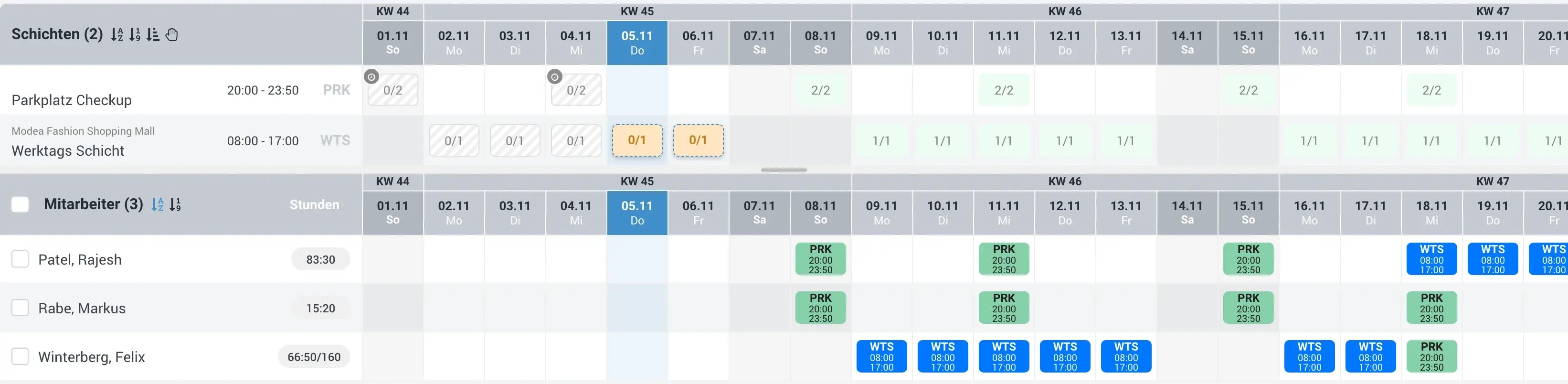
Compared with the current planner, the main change is how you find your way around the grid:
- Calendar weeks and weekends sit directly above the day columns, and today is highlighted in colour.
- Public holidays are marked on each shift. The holidays of the branch the shift belongs to apply, so branches in different federal states each get their own.
- Past shifts are clearly separated, so nobody changes a day that has already run while replanning.
- Custom sorting of shifts and resizable panels for shifts and employees.
Plan with keyboard shortcuts
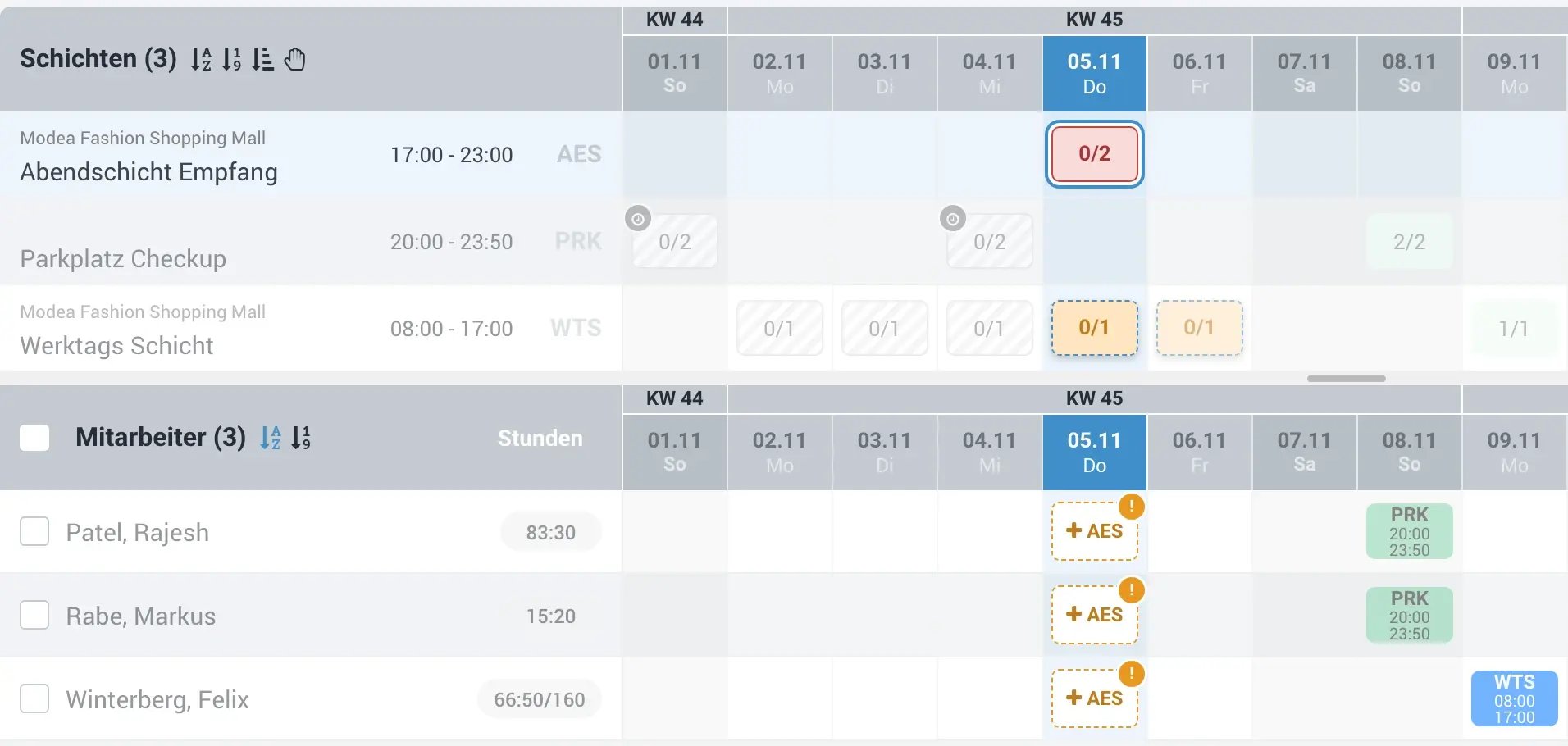
A left click selects an assignment, and a right click opens details and actions. Use Ctrl + left click to select several assignments, Shift + left click to select a range within a shift, and Esc to clear the selection. You then assign the selected slots to an employee with one click. A week of early shifts at the same site becomes a single step.
Warnings while you assign
When a shift is selected, every employee row shows whether the assignment fits. If a required qualification is missing, a warning appears right in the cell.
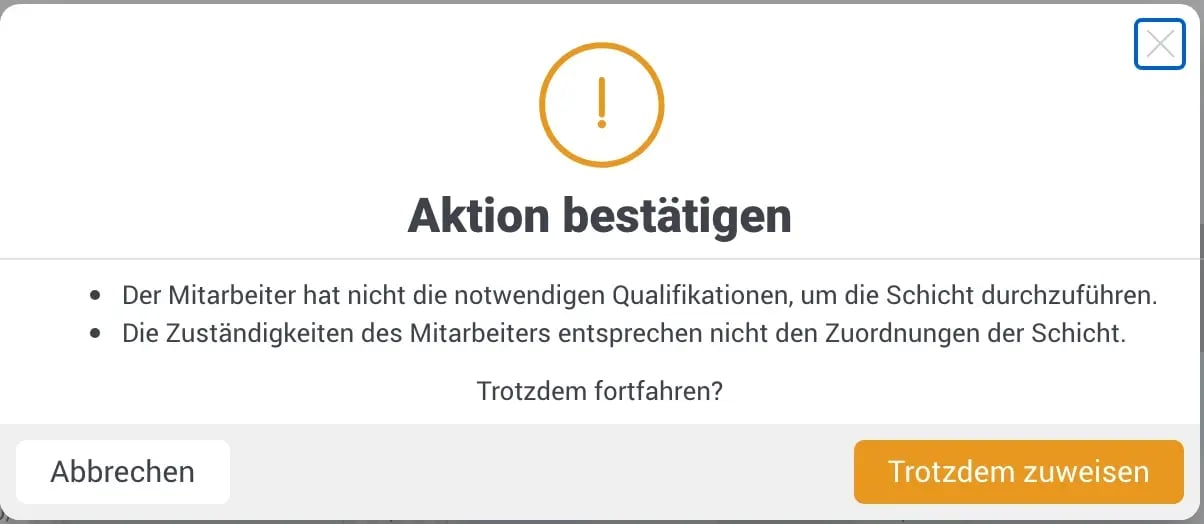
If you assign anyway, the planner asks you to confirm and states the reason. The decision stays with the scheduler, but it is no longer made by accident.
 Please note: shifts now belong to a branch, customer or area
Shifts can no longer be assigned directly to the client account, only to branches, customers or areas. If a shift has several assignments, a primary assignment decides which public holidays apply. Existing shifts that were assigned directly to the client account have been moved to its branches automatically. Where no branch existed, one was created.
The assignment also decides who sees a shift. Planners see and edit it if they are responsible for the selected unit or a level above it. Employees see it on the shift exchange only if their responsibilities match. If a shift belongs to the branch, employees of a single area do not see it.
 More improvements in 9.34.0
- Shift exchange and shift swaps by qualification. Employees now see only shifts for which they hold all required qualifications, valid and approved.
- Faster publishing. Publishing many shifts at once now runs in a single step, which makes it faster and more reliable.
All changes in this and earlier versions are listed in the product updates. For an overview of rota planning, see the duty roster page.
 How to join the beta
- Contact support. Tell our support team that you would like to test the new shift planner.
- Activation for your client account. We enable the planner for your client account. After your next login, you will find it under rota planning in the navigation.
- Work in parallel. The current shift planner works as before, so you can try the new planner without changing your processes.
 FAQ on version 9.34.0
Which shifts does the Shift coverage widget show?
The shifts that are currently running. If no shift is running, the widget says so (“Aktuell läuft keine Schicht”). You can choose to show automatically started shifts as well.
Does the replacement search stop me from assigning an employee with a conflict?
No. The replacement search flags double bookings, breached rest periods, absences and exceeded maximum or target hours, but the decision stays with you.
Do I need to change anything because of the new shift assignment?
No. Shifts that were assigned directly to the client account have been moved to its branches automatically. Where no branch existed, one was created. For shifts with several assignments, check that the primary assignment is correct, because it decides which public holidays apply.
Does the new shift planner replace the current one?
No. Support enables the new shift planner for individual client accounts. It then appears as an additional entry in the navigation, and the current shift planner works as before.
Want to try the new shift planner in your own client account? Contact our support team and we will enable it. Not a COREDINATE customer yet? Talk to our sales team.